Summary
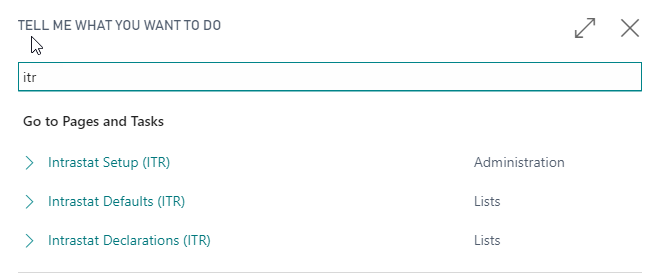
For a summary of the functionalities involved, press ALT + Q and type “ITR”:
Setup
Intrastat Setup (ITR)
In the Setup page enter a serial number and a grouping type:

| Field | Description |
|---|---|
| Intrastat Declaration Nos. | Choose a serial number for the declarations |
| Intrastat Grouping | Options: “Per Line”:every single line is reported in the Intrastat declaration. “Per Document”: the lines in the Intrastat Declaration are grouped by tariff number and document. |
 NB NB |
|---|
| If the setup shown above is entered, Intrastat Declarations will be recorded for all entries that are marked by a combination of “Business VAT Posting Group” and “VAT Product Posting Group"for which the flag “EU Service” in “VAT Posting Setup” is activated. |
VAT Posting Setup
For EU services select the field “EU Service”:

Paesi
In the Countries/Regions page:
| Field | Description |
|---|---|
| Intrastat Code | Choose the codes from the corresponding table of the Intrastat setup for each country of the EU |
| Currency Code | If the Country has not adopted the Euro as currency |

Tariff Numbers
In the Tariff Numbers page you can set the tariff numbers for “Services” and “Goods” to be associated with the item card, which will be automatically used in case of purchase or sale of a product.

The field “Supplementary Unit of Measure” is used to manage the tariff numbers with a different unit of measure from that specified in the document.
| NB |
|---|
| In the case of lines derived from documents posted by the service module, the customs tariff of the line must be indicated in the “Tariff numbers” field in the declaratin page (therefore it is not necessary to fill in the standard field “Service Tariff Numbers” . |
Payment Methods
In the page Payment Methods it is necessary to insert a payment method specific for Intrastat communications
| Campo | Descrizione |
|---|---|
| A | Bank Transfer: the service is payed by bank transfer |
| B | Credit: the service rendered is paid by credit in a bank account. |
| X | Other: the service is paid by other methods |

Feedback
Was this page helpful?
Glad to hear it! Please tell us how we can improve.
Sorry to hear that. Please tell us how we can improve.