Thanks to the Accruals and Simulated General Ledger App (SGL) it is possible to post (for both sales and purchase) simulated entries linked to the chart of accounts, but in parallel general ledger accounts. These records have no impact on the general journal and VAT. Normally these simulations are used to generate interim financial statements, because they allow to simulate rectification and closing entries, which otherwise could only be carried out at the end of the year with the closing of the financial year
Quick Guide
1
Set Competence Dates
2
Create a Template
3
Record Invoices with Accruals or Create Accruals Directly from the Chart of Accounts
4
Verify Simulated Entries in the General Ledger
The Accruals and Simulated General Ledger (SGL) app developed by EOS extends the functionality of the General Ledger module in BC. It allows for the automatic creation of self-reversing adjustment entries, including:
Invoices to be received/emitted for goods and services managed with Purchase Orders (OdA) and Sales Orders (OdV).
Accruals and deferrals entries.
Depreciation entries.
The intrayear entries typically feed into the Simulated Accounting environment, which is a parallel ledger to the General Ledger. Simulated Accounting entries do not appear in the Journal and General Ledger Cards.
Simulated General Ledger (SGL) - SUMMARY
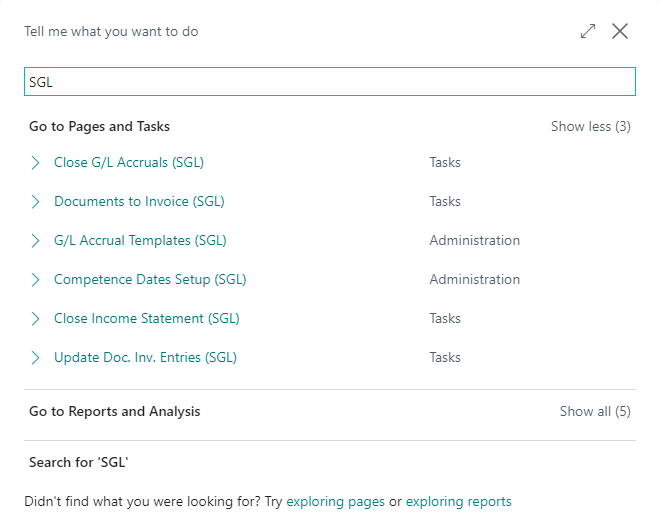
Press “ALT + Q” and type “SGL” to show a list of involved features:
Subscriptions
Some features of this app require a subscription.
The subscription can be activated from Subscription control panel page or directly from the notification messages that the system proposes, by clicking on the link that allows you to start the subscription wizard.
In details:
FULL VERSION: it’s possibile to buy a full version that will last for 12 months, following the wizard and accessing to the EOS AppStore
FREE-DEMO-TRIAL version: it’s automatically activated at first request and give full access to all features. This trial expires after 20 days from the activation
.png)