Chart of cost accounts
The chart of cost accounting can be linked to the Chart of accounts in mode 1 to 1, N to 1 or, if necessary, 1 to N: G/L account balances (G/L + simulated) are reported in the Cost accounts.
In order to create the Chart of cost accounts depending on the G/L Chart of accounts it is possible to execute these two functions:
-
Get Cost Account From Chart of Accounts: copies the accounts of the Chart of accounts in the Chart of cost accounts depending on the “G/L Synch. Account” field
-
Register Cost Account in Chart of Accounts: analyzes the Cost accounts and update (if different) the values in the “Cost Account No.” field of the G/L accounts which are present in the “G/L Account Range” field
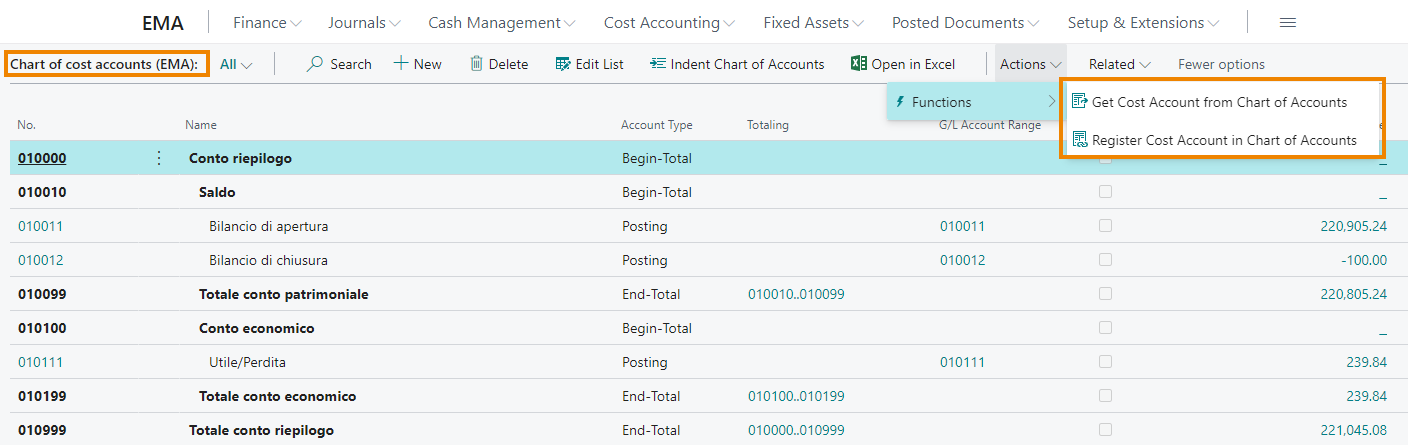
The “G/L Account Range” field shows the G/L account or accounts linked to the specific C/A account.
Feedback
Was this page helpful?
Glad to hear it! Please tell us how we can improve.
Sorry to hear that. Please tell us how we can improve.