Fields Setup DocFinance

Through the synchronization mode, it is possible to specify the mode with which exports to DocFinance are managed.
For master data:
| Field | Description |
|---|---|
| Full synchronous (default) | With this mode, the master data exported to DocFinance are generated at the time of the request from DocFinance, all master data are exported every time, no further setup is required. Optimal for small and medium data volumes. |
| Full asynchronous | With this mode, the master data exported to DocFinance are generated in advance of the data request from DocFinance, all master data are exported every time. At the time of the request, the data are therefore already ready to be exported (any changes made between preparation and actual export will be exported with the next request). In this mode, it is possible to use a job queue, or prepare the data for export through the dedicated action. |
| Incremental asynchronous | With this mode, the master data exported to DocFinance are generated in advance of the data request from DocFinance. Unlike the full asynchronous mode, only the differences (new or modified records) compared to the last export are exported, significantly reducing the volume of transmitted data. At the time of the request, the data are therefore already ready to be exported (any changes made between preparation and actual export will be exported with the next request). This mode is optimal for large data volumes. In this mode, it is possible to use a job queue, or prepare the data for export through the dedicated action. |
For receivables/payables dates:
| Field | Description |
|---|---|
| Full synchronous (default) | With this mode, the due date data exported to DocFinance are generated at the time of the request from DocFinance, all due dates are exported every time, no further setup is required. Optimal for small and medium data volumes. |
| Full asynchronous | With this mode, the due date data exported to DocFinance are generated in advance of the data request from DocFinance, all due dates are exported every time. At the time of the request, the data are therefore already ready to be exported (any changes made between preparation and actual export will be exported with the next request). In this mode, it is possible to use a job queue, or prepare the data for export through the dedicated action. |
Actions for Asynchronous Modes
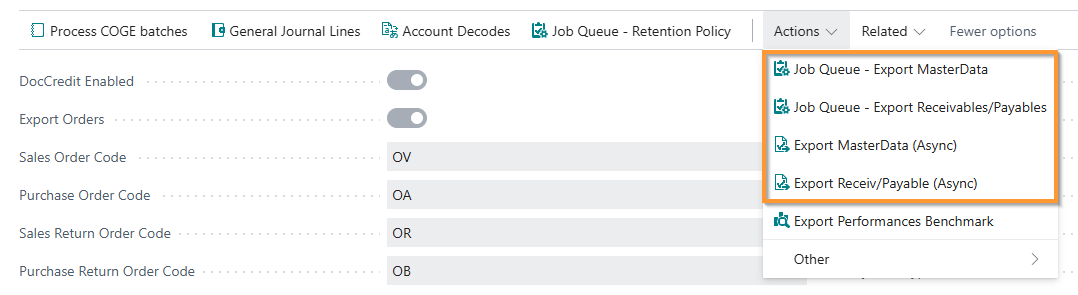
When using asynchronous modes (complete or incremental), the following actions are available to manage data export:
Available Actions in the “Actions” Menu
1. Job Queue - Export MasterData
When to use it:
- When you want to automate master data preparation through a job queue
- Ideal for scheduling exports at specific times (e.g., during the night)
- Available for both asynchronous modes (complete and incremental)
How to use it:
- Access the “Actions” menu in the setup page
- Select “Job Queue - Export MasterData”
- Configure the job queue with the desired frequency
- The system will automatically prepare the data according to the set schedule
2. Job Queue - Export Receivables/Payables
When to use it:
- When you want to automate due date data preparation through a job queue
- Ideal for scheduling exports at specific times
- Available for complete asynchronous mode
How to use it:
- Access the “Actions” menu in the setup page
- Select “Job Queue - Export Receivables/Payables”
- Configure the job queue with the desired frequency
- The system will automatically prepare the due date data according to the set schedule
3. Export MasterData (Async)
When to use it:
- When you want to manually prepare master data
- Useful for on-demand exports without waiting for the job queue
- Available for both asynchronous modes (complete and incremental)
How to use it:
- Access the “Actions” menu in the setup page
- Select “Export MasterData (Async)”
- The action immediately prepares the data for export
- The data will be available for DocFinance at the next request
4. Export Receiv/Payable (Async)
When to use it:
- When you want to manually prepare due date data
- Useful for on-demand exports without waiting for the job queue
- Available for complete asynchronous mode
How to use it:
- Access the “Actions” menu in the setup page
- Select “Export Receiv/Payable (Async)”
- The action immediately prepares the due date data for export
- The data will be available for DocFinance at the next request
Important Notes
- Job Queue actions are recommended for complete process automation
- Manual export actions (Async) are useful for exceptional situations or testing
- In incremental asynchronous mode, only modified or new data is prepared, optimizing performance
- Any changes made between preparation and actual export will be included in the next request
Feedback
Was this page helpful?
Glad to hear it! Please tell us how we can improve.
Sorry to hear that. Please tell us how we can improve.
EOS Labs -