Sales and purchase Promotions for WholeSales - SUMMARY
Press ALT + Q and digit “SPP” for a list of the features involved:
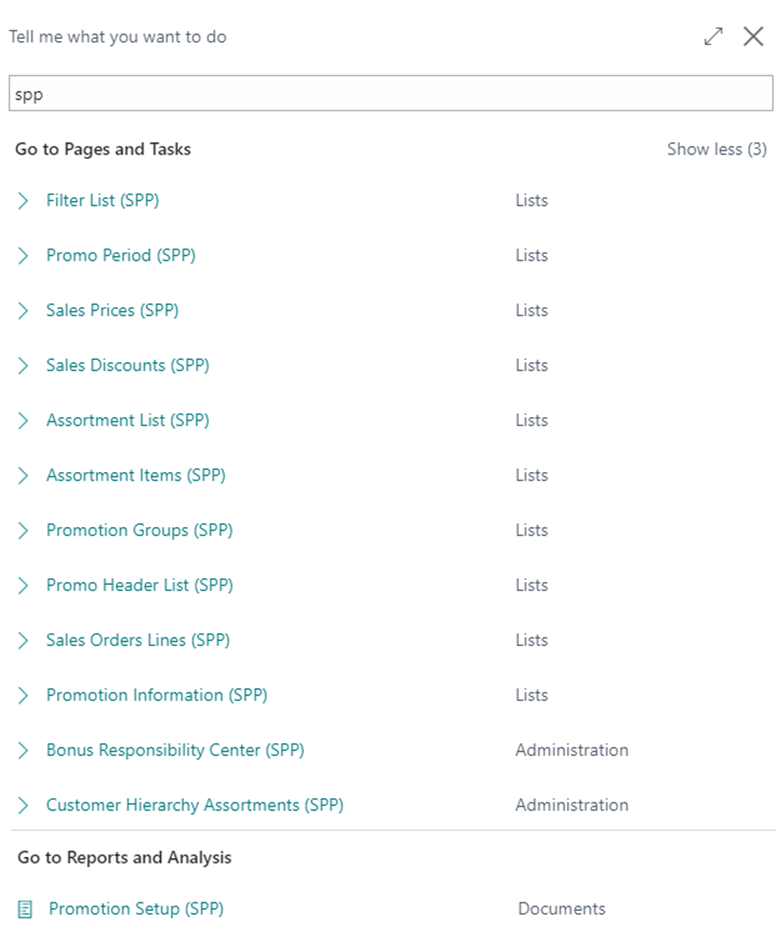
Promotion Information (SPP)
SPP app allows you to set up rules and conditions (free gifts or discounts) to apply on sales lines based on filters that users can define in the setup.
On the page Promotion Information (SPP) you can enter new promotion plans by pressing “New”:
/Immagine17.png)
| Field | Description |
|---|---|
| Code | enter a code for the promotion rule |
| Description | enter a free description |
| Rule Type | define when the plan is to apply. The options are: Alternative: compared to another promotion Mandatory: always applied |
| Alternativity Group Code | insert alternativity group code if Alternative is set in the previous field |
| Exclusive | specify the relationship among promotions defined - All: deletes all inserted discounts and set itself only. - All Not Exclusive: deletes all inserted discounts that have a value other than blank in the “Exclusive” field. - Equal Priority: replaces the discount value for all discounts that are linked to a promotion information with the same priority. - Higher or Equal Priority: it substitutes discount value for all discounts linked to a promotion information with the same priority and deletes discounts with higher priority value. - Lower or Equal Priority: it substitutes discount value for all discounts linked to a promotions information with the same priority and deletes discounts with lower priority value. |
| Priority | indicates the priority level used to sort and apply discounts. Lower values have priority over higher values. |
Feedback
Was this page helpful?
Glad to hear it! Please tell us how we can improve.
Sorry to hear that. Please tell us how we can improve.
EOS Labs -